
Summary: The Chigee AIO-5 delivers on its core promise: bringing Apple CarPlay to the BMW GS in a way that actually works while riding. It’s not a replacement for a standalone GPS, but the usability, screen quality, and Wonder Wheel integration make it one of the best options available today. Sometimes this device drops the CarPlay signal which is common for wireless CarPlay, unfortunately.
If you’re looking to add Apple CarPlay to a BMW GS, the Chigee AIO-5 was one of the first solutions available. Adding Apple CarPlay to a BMW GS isn’t officially supported by BMW, which is why devices like the Chigee AIO-5 exist. Instead of replacing your bike’s system, the AIO-5 acts as a bridge—mirroring your phone’s CarPlay interface onto a dedicated, weatherproof display mounted in the factory navigation cradle. The hardware is solid. The software is good, but not great
Here’s my story after one year with the device.
I’ve wanted CarPlay on a motorcycle for years. BMW never delivered it, and Rivian still refuses to support it in the R1T, which makes this even more ironic—the GS got CarPlay before the truck did. When I saw the Chigee AIO-5 on Kickstarter, I backed it immediately. If I could bring my phone experience directly to the handlebars, that would be a massive win.
The wish list was pretty simple. I wanted to hear text messages while riding. I wanted third-party ecosystem support so I could monitor blood sugar notifications — which as a Type 1 diabetic is a genuine safety concern, not a nice-to-have. Also, I wanted a consistent, familiar interface that mirrors what I’m used to on my phone without having to fumble with the phone itself.
The BMW Navigator VI: An Expensive Lesson
Before the Chigee, I had the BMW Navigator VI sitting in that cradle. I’ll be honest—it was not a great use of money. I appreciated the altimeter and the ability to configure the data screen to show elevation, mileage remaining, and daylight remaining. The big advantage is that the maps live on the device itself, so you don’t need cell service for navigation. That matters on rides through the Sierras or up in the Trinity Alps where coverage disappears for hours at a stretch.
But the Garmin mapping tools are significantly harder to use than just about any other platform. Planning a route on the BMW Navigator compared to pulling up Google Maps on my phone felt like going back to MapQuest circa 2001 (and even that’s a compliment).
Chigee AIO-5 Setup and Installation (BMW GS)
Unboxing the device felt well thought out. The AIO-5 has a sturdy build with a beautiful glass screen, and Chigee included a screen protector in the box. The device dropped directly into the BMW Nav cradle, making it feel like an OEM replacement rather than an aftermarket bolt-on. The hardware side of this device is not where Chigee cut corners – the magnesium/aluminum chassis and IP68 waterproofing stand out.
Across every review I’ve read and my own experience, build quality is the one thing everyone agrees on.
I was surprised, though, that the AIO-5 is a smaller device than the Navigator VI. There’s visible margin around the factory cradle that ideally would have been covered by the screen. As I get older, my eyes are going to want that additional real estate. I am a BMW rider after all. 😜
Since owning it just over a year, there have been four or five software updates—one or two of them being meaningful. Recent firmware added vertical Wonder Wheel scrolling, improved CarPlay stability, and faster boot times. I’ve done updates at home and out on the road using my phone as a hotspot. Either method works well.
Once on the bike, the screen quality really shows. It’s bright and visible in full sun—even more so than my iPhone, which matters when you’re riding into a low afternoon sun on a westbound highway.

Using Apple CarPlay on a Motorcycle
The AIO-5 works like any other CarPlay device once it’s running. You can interact with it via touchscreen or the Wonder Wheel on the left handlebar. Since I’m shorter than the average BMW GS rider (who always seems to be 6’5”), I rely heavily on the Wonder Wheel instead of reaching forward to tap the screen.
On a 5-inch display, that’s not just preference—it’s necessity. The CarPlay icons are small, and with gloves on, tapping accurately is hit or miss. The Wonder Wheel quickly becomes the primary way to navigate the interface.
I try to keep my core apps—Google Maps, Spotify, Calendar, and Messages—on the CarPlay home screen. The sidebar shows the three active apps, and for me that’s almost always Maps for navigation, Spotify for music, and Messages running in the background. Setting this up before starting the ride avoids unnecessary scrolling later.

Once you get used to it, the Wonder Wheel feels natural, though there’s a short learning curve. The cursor doesn’t always land where you expect, and on some BMW models the Wheel can control both the bike’s TFT and the Chigee, which adds a bit of friction. If the device stops responding, holding the left switch toggles control back to the nav unit.
One persistent quirk shows up in the music controls. Selecting an option requires pushing the Wheel to the right. If the cursor is on the skip-forward button, that action jumps to the next track. Intuitively, I want to push left to go back—but that actually navigates back in the menu. To rewind or go to the previous track, you have to scroll to the back button and then press right. It works, but it takes longer than expected to retrain that muscle memory.

Where the device really shined was heading up Mount Diablo. Having the remaining distance and navigation info on screen while climbing the switchbacks to the summit was exactly the experience I’d been wanting—a quick glance down, confirm I’m on the right road, see how far to the top, and eyes back up. That’s the promise of CarPlay on a motorcycle, and in that moment, it delivered. I could connect falling temperatures to the remaining distance and quickly get a sense if I need to layer up.


Note: When in Spotify and having Google Maps or Apple Maps routing, the Wonder Wheel loses focus on the ⏩ icon. Changing the song after a “turn left in 1 mile” alert on the bottom of the screen, requires a full scroll back to the ⏩ icon.
The Diabetes Dashboard
For riders with Type 1 diabetes, this isn’t just a convenience. It’s a meaningful safety upgrade. This is the first time I’ve had continuous, glanceable glucose data integrated directly into my riding.
I can leave the Dexcom widget visible on the CarPlay home screen, which means my blood sugar reading stays front and center without being subject to my iPhone’s screen timeouts. After a meal, or if I want to keep an eye on the action of insulin during a ride, that persistent display matters.


Before the Chigee, I was running my phone on a separate mount next to the AIO-5 with the Loop app open showing glucose graphs, active insulin, and delivery data. I’d often lose visibility due to screen timeouts, forcing me to check my phone when I needed the data most.
Chigee’s Native UI
Beyond CarPlay, the AIO-5 has its own interface offering lean angle measurement, ride tracking, tire pressure monitoring, tachometer, and other motorcycle-specific data pulled from the bike’s systems.
The lean angle indicator is genuinely fun—informative and slightly humbling when you see the actual numbers versus what your body thinks it’s doing. The tachometer is useful too. Having RPM displayed as a number rather than reading the analog sweep on the BMW’s TFT is helpful for a quick glance. That said, the UI surrounding it is a bit busy—the layout crams too much information into too little space, and the visual hierarchy doesn’t always make it clear what’s important versus what’s noise.

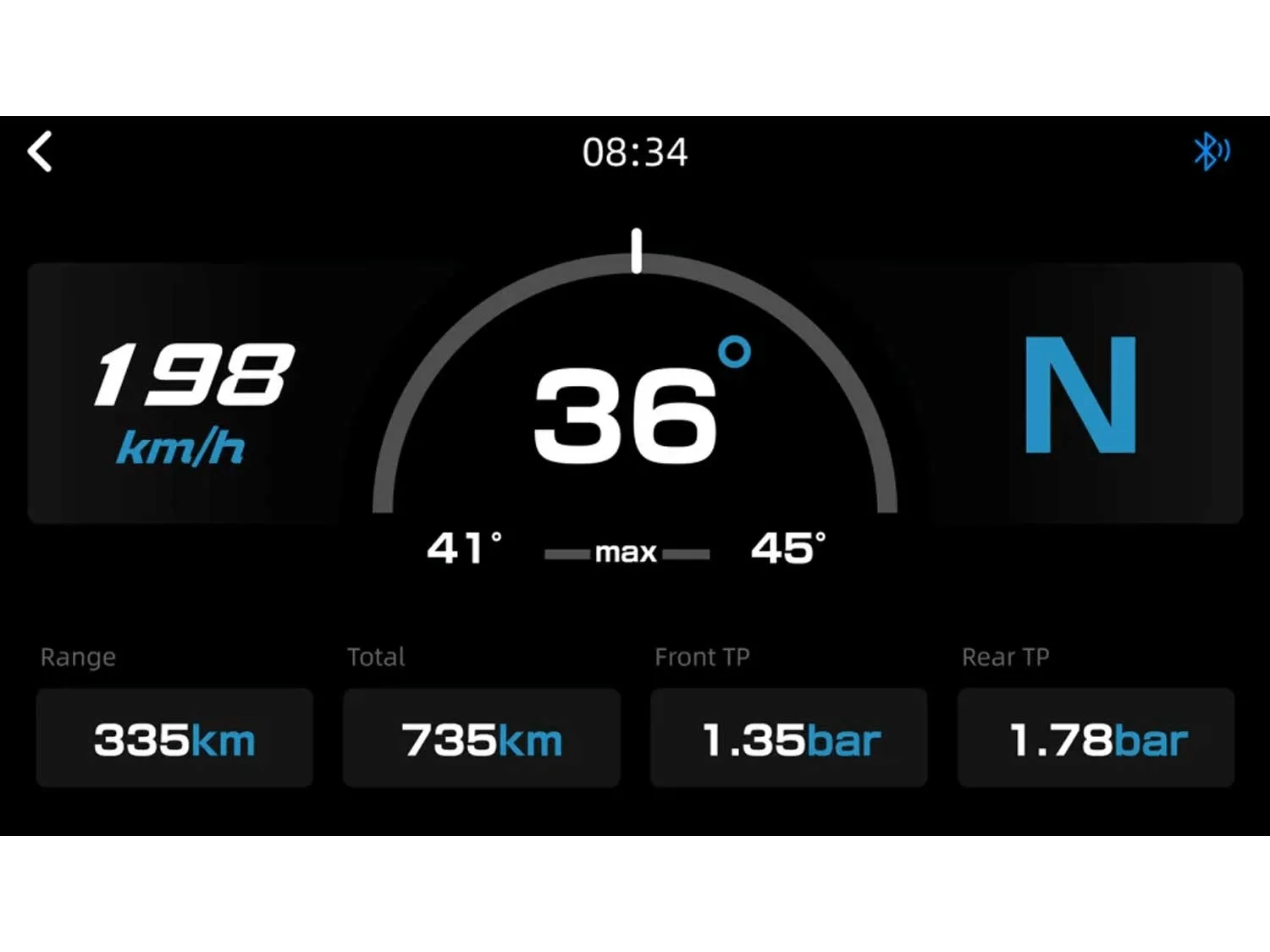


The tire pressure monitoring has been inaccurate at best. The GS already has its own factory TPMS, so this felt redundant and not particularly trustworthy. I mostly ignore it.
Chigee AIO-5 Pros and Cons
I generally like the Chigee AIO-5. It was a good investment at the time and has demonstrably made the experience on the GS significantly better. But there are things I wish I’d understood going in.
It’s a phone repeater, not a GPS. This is the big conceptual shift from a Garmin. The Chigee mirrors your phone’s CarPlay interface onto a rugged, weatherproof screen. Everything it does depends on your phone being connected and functional. As mentioned in the Peak Design Qi2 charger review, your phone might not have the thermal capacity to charge and run all the apps in the heat. If your phone dies or loses its connection, the device becomes a GPS speedometer and not much else. The Navigator VI had maps on board—the Chigee has none. The new BMW Motorcycle App does have onboard maps for your phone.
Your phone takes a beating. Running Bluetooth, WiFi, and GPS simultaneously drains battery faster than expected, so on longer rides I keep it plugged in. That hasn’t been a major issue with a powered mount, but if your phone lives in a jacket pocket, you’ll need to plan around it.
Heat is the bigger concern. In warmer conditions, charging while navigating can push the phone to overheat, throttling performance or stopping charging altogether. I haven’t run into it often in the Bay Area, but on a 100+ degree ride through the Central Valley, it’s easy to imagine it becoming a real limitation—especially if rain forces you off a wireless charger and onto battery alone.
In hot weather, the combination of charging and GPS can cause the phone to overheat and throttle or shut down charging entirely. In the Bay Area I haven’t hit this much, but I could see it being a real problem on a mid-August ride through the Central Valley when it’s 105 degrees. Also, I’d need to keep the phone off the wireless charger in the rain, putting more pressure on the battery.
Cell coverage matters more than you think. Even with offline maps downloaded in Google Maps, navigation apps behave differently without a data connection—no real-time traffic, no dynamic rerouting, and some apps don’t handle offline mode gracefully via CarPlay. For riders who spend a lot of time in the Sierras or anywhere coverage gets spotty, this is worth thinking about. You get a dramatically better user interface but lose the standalone reliability of an on-board GPS.
CarPlay drops sometimes. Maybe every 2,500 miles or so, CarPlay just stops working mid-ride. Sometimes restarting the phone fixes it, sometimes restarting the motorcycle does. I’ve tried resetting the device and clearing Bluetooth info on my phone—I honestly don’t know why it drops or what reliably fixes it. In talking with other riders, it seems to be more of a CarPlay protocol issue than Chigee’s implementation. Just don’t be surprised when it happens.
Would I Buy This Device Again?
Would I buy the AIO-5 again today? No—but only because the AIO-6 now exists. The core experience works, and it delivers on what it promises. I’d just want the bigger, brighter screen.
The Chigee AIO-6 addresses this with a 6-inch display, bumping brightness from 1,200 nits to 2,300 nits while keeping the same 1280×720 resolution. It also adds optional dash cams, 4G connectivity on the LTE model, and a proper quick-release system. The AIO-6 Max runs $460 and requires a separate BMW Quick-Release Module at about $105—so roughly $565 total for BMW integration, compared to $499 for the AIO-5 BMW edition. For that additional $65 or so, you get a bigger screen, brighter display, and more accessory options. I’d pay the difference.
For what it was when I bought it, though, the AIO-5 delivered exactly what I hoped for: CarPlay on the motorcycle, integrated into the BMW cockpit, controlled by the Wonder Wheel, and capable of keeping my blood sugar data visible while I ride. That’s a win by any measure.
What works 👍🏻
- Clean CarPlay integration with Wonder Wheel
- Bright, readable display
- Diabetes visibility is a real advantage
What needs work 👎🏻
- Fully dependent on your phone (not a standalone GPS)
- Occasional CarPlay drops
- Smaller screen vs newer AIO-6
FAQ: CarPlay on the BMW GS
Q: Does BMW GS support Apple CarPlay?
No, BMW does not natively support Apple CarPlay on the GS. Devices like the Chigee AIO-5 provide a workaround by mirroring your phone’s interface.
Q: Is the Chigee AIO-5 a GPS?
No—it’s a phone-powered display. It mirrors your phone’s CarPlay interface rather than running its own navigation system.
Q: Can you use CarPlay without cell service?
Partially. Offline maps work, but features like traffic and rerouting are limited without a data connection.






Leave a Reply